How I Actually Build with GenAI Now
After building multiple apps with GenAI, I realized prompts weren’t enough. This is the workflow I use to reduce ambiguity, avoid rework, and ship faster.
For the past four months, I’ve been building small personal apps with GenAI as my “junior partner.”
Simple things like signup and signin worked on the first try. Anything slightly complex needed multiple back-and-forths, wasting hours (and tokens).
After repeating this across a few apps, I realised my mistake. The problem wasn’t just the model. And it definitely wasn’t solved by better prompts.
Chat is a terrible place to store decisions.
Every new session forgets what the previous one agreed to. So I stopped trying to “improve prompts” and instead changed the system.
Chat became negotiation. Markdown became memory. The repo became truth.
This is the workflow I now use.
This didn’t come from a single experiment. I kept running into the same set of problems while building a few small apps with GenAI in the loop:
- Zlynks – an Amazon affiliate link manager
- tweets.jjude.com – a home for my tweets
- Read2Reflect – a curated essay platform
- ThoughtSnaps – an app to create social-media-ready images
I still build things myself. It’s the only way I’ve found to understand how GenAI actually behaves, instead of relying on second-hand opinions.
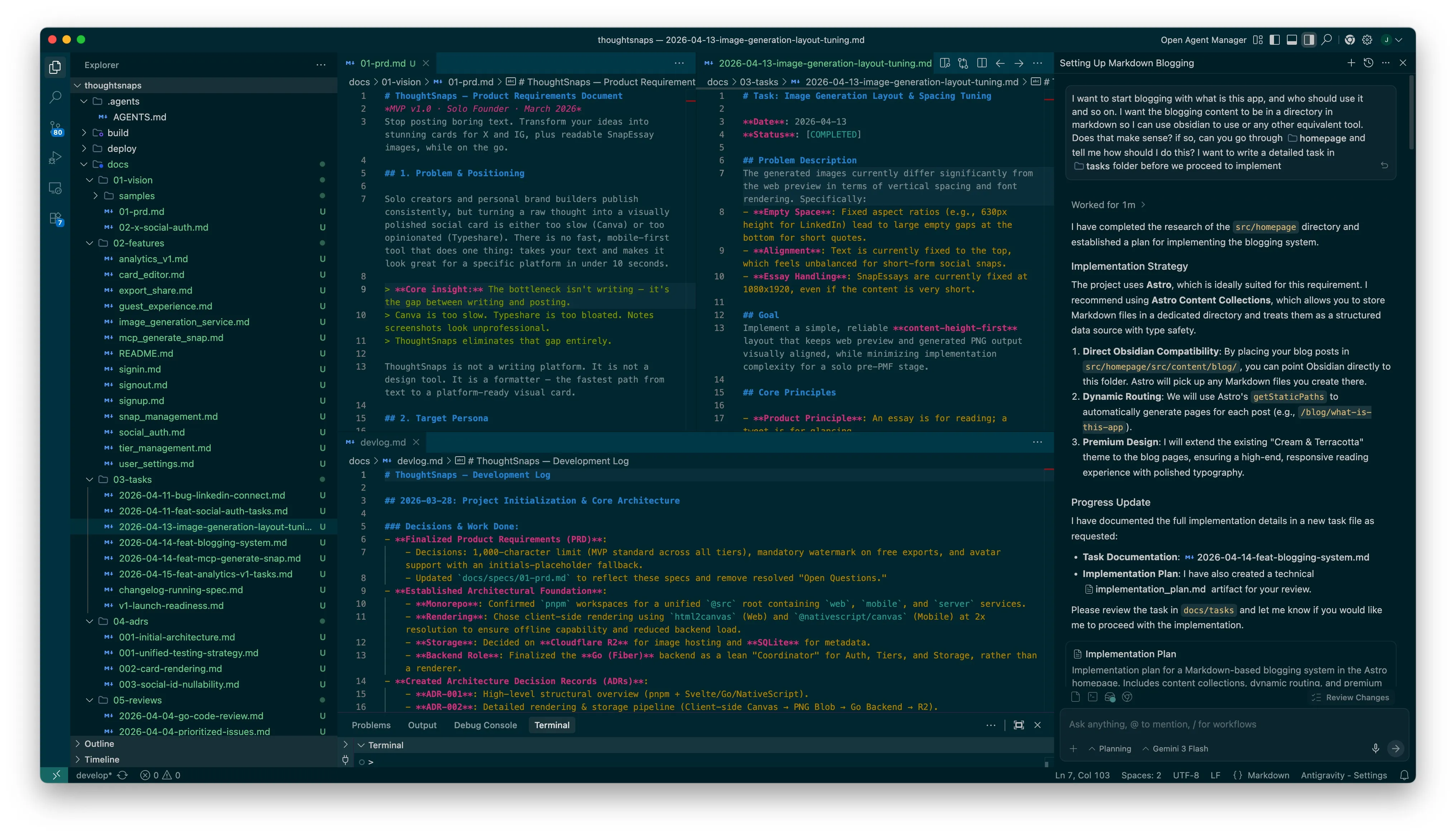
# The Workflow in a Nutshell
Instead of one giant prompt, I follow a modular loop that keeps the agent aligned with my intent:
- Shape the idea (in Claude chat)
- Lock it into a PRD (markdown)
- Break it into features
- Break those into atomic tasks
- Generate code task by task
- Review using a different tool
- Log what happened
One thing that matters here, these tools play different roles:
- I use Claude to think, question, and shape the PRD
- I use Anti-Gravity for code generation
- I use Cursor for code reviews
They are not interchangeable for me. Each one has a role.
# 1. Idea → PRD (docs/01-vision/)
I start with a rough idea and take it to Claude.
The raw prompt often looks like this:
Want to create a mobile app (both ios and android) and a corresponding web app.
The features shud be:
- type a block of para of text
- select a template
- save locally (on web app download)
- share to social media
Let me know if you understand this correctly before proceeding.
From there, it’s a back-and-forth.
Claude will point out gaps. I’ll clarify. It will make assumptions. I’ll correct them. A few iterations in, the shape of the product becomes clearer.
Typical things that come up:
- edge cases I didn’t think of
- flows that don’t fully make sense
- constraints I hadn’t defined
Out of this, I write a PRD:
- users
- features
- constraints
- edge cases
This becomes my North Star.
Not because it’s perfect, but because it’s stable. When I come back after a few days, I don’t have to reconstruct what I was thinking. It’s already there.
# 2. Repo + Docs Layout
Once the PRD is ready, I initialize the repo and create a strict folder structure for documentation. It looks like this:
docs/01-vision/→ PRDdocs/02-features/→ feature breakdowndocs/03-tasks/→ atomic tasksdocs/04-adrs/→ decisionsdocs/05-reviews/→ review notesdocs/devlog.md→ running log
Plus .agents/AGENTS.md for rules.
My rule is simple: If it’s not written down, it doesn’t exist for the agent.
Chat becomes disposable. Markdown holds memory.
# 3. Breaking Features Down (docs/02-features/)
A PRD is still too high-level. When I hand that to a code generator, it fills gaps on its own. That’s where things start drifting.
So I break features into smaller pieces with clear acceptance criteria.
I use simple Gherkin-style thinking, not strictly formal, just enough to force clarity.
Example:
# Feature: Guest Experience
## User Acceptance Criteria (UAC)
### Scenario: Feature Gating
- **Given** a guest is using the editor.
- **When** they try to export their work.
- **Then** the final image contains a subtle "thoughtsnaps.app" watermark.
- **And** they are limited to a 500-character soft-limit.
This step reduces ambiguity, but it still leaves room for interpretation.
# 4. Atomic Tasks (docs/03-tasks/) — The Shift
This was the turning point for me.
Earlier, I would take a feature and say, “implement this.”
The AI would generate a bunch of code that looked right. Then I would spend time fixing assumptions it made.
The problem wasn’t the code. It was the instruction.
Instead of asking for implementation, I asked the agent to expand features into tiny tasks.
A snippet of a task file reads like this.
# Task: Image Generation Layout & Spacing Tuning

**Date**: 2026-04-13
**Status**: [COMPLETED]

## Problem Description
The generated images currently differ significantly from the web preview in terms of vertical spacing and font rendering. Specifically:
- **Empty Space**: Fixed aspect ratios (e.g., 630px height for LinkedIn) lead to large empty gaps at the bottom for short quotes.
- **Alignment**: Text is currently fixed to the top, which feels unbalanced for short-form social snaps.
- **Essay Handling**: SnapEssays are currently fixed at 1080x1920, even if the content is very short.

## Tasks
- [ ] Update `src/img_gen/lib/templates.js` (Source of Truth) with new centering and height logic.
- [ ] Run `task sync:web-templates` to update `src/web/src/lib/templates.js`.
- [ ] Modify `src/img_gen/api/generate.js` to handle optional `height`.
- [ ] Update `renderTemplate` to return the new layout configurations.
- [ ] Implement avatar pre-fetching.
- [ ] Update `CardRenderer.svelte` to support mixed mode (fixed social, elastic essays).
- [ ] Add soft/hard character-limit hints and errors in editor UX.
Each task small enough that there’s very little room to guess.
Then I run a loop: one task → generate code → verify → next task
What changed:
Before:
- I got “almost correct” code that broke in edge cases
- I had to reverse-engineer what the AI assumed
After:
- the task itself carries context
- the output is usually aligned with what I expected
The difference is not intelligence.
It’s how much interpretation I leave open.
When the instruction is vague, the AI fills in blanks.
When the instruction is tight, it executes.
The task becomes the context.
This reduced my frustration more than anything else I tried.
# 5. ADRs (Architecture Decision Records)
There’s another failure mode that shows up later.
You come back after a few weeks and wonder:
“Why did I do it this way?”
And you genuinely don’t remember if it was a good decision or just something suggested in a chat.
So I write down key decisions:
- why this stack
- why this approach
- what tradeoffs I accepted
This is not for documentation quality. It’s for not second-guessing myself later.
The initial ADR for ThoughtSnaps reads like this:
# ADR 001: Initial Architecture Decisions
*Date: March 2026 · MVP v1.0*

This record outlines the core technical foundation for ThoughtSnaps. Detailed implementation specs for specific sub-systems (like Rendering) are documented in subsequent ADRs.

## 1. Monorepo with pnpm Workspaces
We use a `pnpm` monorepo under the `@src` root. This allows the Svelte-based **Card Renderer** to live in `packages/shared` and be imported by both the SvelteKit web app and the NativeScript mobile app, ensuring 100% visual parity across platforms.

## 2. Client-Side Rendering (Canvas)
Rendering is the responsibility of the client. We use `html2canvas` (Web) and `@nativescript/canvas` (Mobile) to draw Svelte components at 2x resolution. This bypasses the need for heavy server-side browser engines for the MVP. See [ADR-002](file:///Users/jjude/SyncedFolders/pCloud/04-sdl/02-produce/03-code/products/thoughtsnaps/docs/adrs/002-card-rendering.md) for the full pipeline.

## 3. Go Backend as "Store & Coordinator"
The Go (Fiber) backend handles Authentication, Tiers, and Metadata. It does **not** perform rendering. For subscribers, it receives PNG blobs from the client and coordinates storage in **Cloudflare R2**, returning a public URL for sharing.

## 4. System Font Stack & Minimal Branding
To ensure zero loading latency on mobile, we strictly use a system font stack (Inter/Roboto). Branding is typographic for MVP, and a "thoughtsnaps.app" watermark is applied to all free-tier exports.
# 6. Cross-Tool Review
I don’t trust the same tool to review its own code.
So I split roles:
- Anti-Gravity generates code
- Cursor reviews it
I take the code and ask Cursor:
“Look for bugs, edge cases, and performance issues.”
This catches things surprisingly often:
- inefficient loops
- security vulnerabilities like bad assumptions about input
The point is not that one tool is better.
It’s that the reviewer didn’t generate the code, so it’s not biased toward defending it.
# 7. The Devlog
At the end of a session, I append a short note to docs/devlog.md.
- what I implemented
- what changed
- what’s next
This saves me from re-reading git history and helps me resume quickly after gaps. It also makes generating a changelog trivial.
# Why This Works
- Clear separation of thinking, memory, and execution
- Less room for ambiguity at each step
- Lower mental load over time
Most importantly:
I stopped expecting the AI to remember context, and designed a system that doesn’t rely on it.
# Trade-offs
- Overkill for quick scripts
- Not enough for high-compliance systems
# Closing
If I had to keep just three things:
- atomic tasks
- cross-tool review
- ADRs
Everything else helps. These three fundamentally changed how I develop apps with GenAI tools.
I use ChatGPT to write and edit, but There Is No Slop Here.
This is an ongoing project. If you want to follow along with how this setup evolves, subscribe to my RSS feed, or connect with me on LinkedIn and X.
Under: #aieconomy , #tech