How I'm Using Hermes Agent to Build a Personal Knowledge Base That Compounds
Building an LLM Wiki with Hermes Agent on Opalstack using DeepSeek, Obsidian, and OpenRouter to create a personal knowledge base that compounds.
I used to lose most of what I learned. A great podcast episode. A long essay. An hour-long YouTube interview with someone like Tony Fadell. I'd consume it, nod along, and three days later remember maybe two bullet points. The rest evaporated.
That changed when I wired up Hermes Agent with an LLM Wiki. Now I have a system that takes anything I find worth keeping — YouTube videos, articles, daily expenses — and files it into a growing web of interlinked notes. The notes talk to each other. Cross-references form automatically. I can pull up anything from my phone, and at the end of the month I can look at my expenses without opening a spreadsheet.
This is not about automating note-taking. It is about building a knowledge base that gets more useful the more you put into it.
Let me walk you through what I built and how I use it.
# What Hermes Agent Is, and How I'm Running It
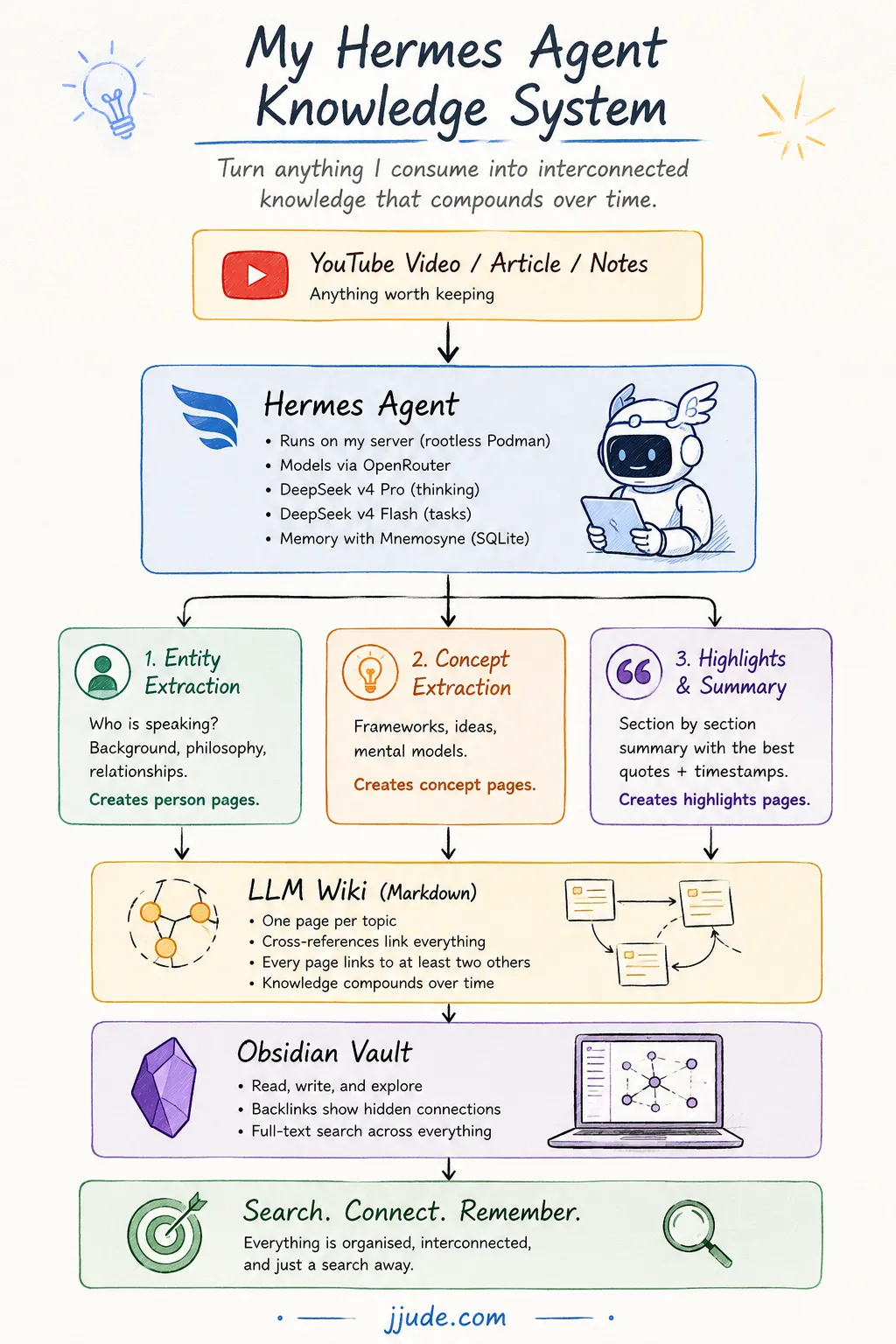
Hermes Agent is an AI assistant that runs on my own server. It connects to large language models through OpenRouter, which means I am not tied to a single provider. I pick the model that fits the task.
I run it on Opalstack using rootless Podman containers. This matters because rootless Podman means the agent runs with ordinary user privileges — no root, no extra attack surface. It sits quietly on a cheap shared hosting plan and does its work in the background.
For models, I use two from DeepSeek through OpenRouter:
- DeepSeek v4 Pro for anything that needs actual thinking — summarizing transcripts, extracting concepts, writing highlights.
- DeepSeek v4 Flash for mechanical tasks like generating headings or checking API credits.
I picked DeepSeek because the price-to-quality ratio is hard to beat. A full YouTube transcription and wiki ingestion costs me about eight to twelve cents. That is the kind of number where you stop worrying about usage and start using the thing.
For memory across sessions, I use Mnemosyne — a local SQLite database that Hermes ships with. The default memory file in Hermes is a plain markdown file, which works fine for small setups but runs into size limits quickly. Mnemosyne is different. It stores facts, preferences, and context as structured records in SQLite, with vector search and full-text indexing built in. It remembers what I told it last week, last month, and surfaces the relevant bits when they matter. No external service. No vector database to manage. Just a .db file on disk that quietly makes the agent feel like it actually knows me.
# The LLM Wiki: Notes That Talk to Each Other
The wiki is the heart of the system. It is based on Andrej Karpathy's LLM Wiki pattern — a directory of plain markdown files, one per topic, linked together with wiki-style [[cross-references]]. No database. No special app needed. Just files.
The structure is simple:
- Raw sources go in one folder. Transcripts, articles, anything I ingest. These never get edited — they are the ground truth.
- Wiki pages go in another set of folders. Entities for people and organizations. Concepts for ideas and frameworks. Highlights for curated video and reading summaries.
- A schema file defines the rules. Every page needs frontmatter with tags, dates, and source links. Every page must link to at least two others.
The rule about cross-references is the one that makes this work. When I ingest a podcast with Brian Halligan, the agent does not just dump a summary. It creates separate pages for each idea Halligan discusses — constructive dissatisfaction, the EV > TV > Me framework, spiky teams, hiring practices — and links them all together. Later, when I ingest something else that touches on hiring, the agent updates that page instead of creating a duplicate. The knowledge compounds.
# YouTube Videos to Structured Wiki Pages, in Under Two Minutes
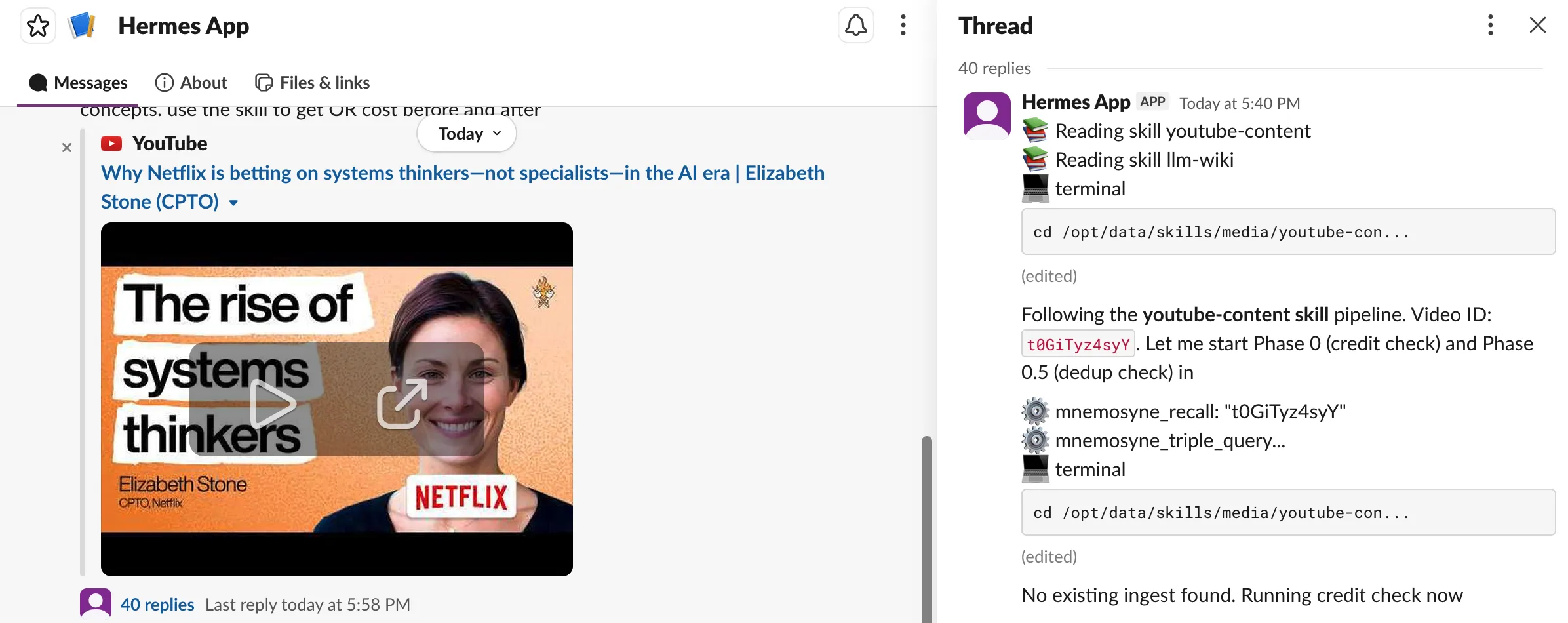
This is the workflow I use most. I send Hermes a YouTube link, and it does the rest.
The first thing the agent does is pull the transcript. But here is the part I am proud of — the transcript itself never enters the agent's context. It gets saved to a temp file on disk. Three sub-agents then read it directly from disk and each does a different job, all at the same time:
- Entity extraction — Who is speaking? What is their background, their philosophy, their key relationships? This produces a person page.
- Concept extraction — What frameworks, mental models, and ideas come up in the conversation? Each significant concept gets its own page.
- Highlights — A narrative summary, section by section, with the best quotes timestamped.
The reason I did it this way is cost. When I first set this up, I was feeding the entire transcript into the main agent. Each video cost about thirty-six cents. By routing the transcript to disk and having sub-agents read it from file paths instead, I cut that to eight or twelve cents. It also keeps my main conversation clean.
The output is thorough. A typical highlights page runs 200 to 300 lines. It has an executive summary, ten to fifteen sections covering every major theme in the video, curated quotes with timestamps, and a theme index that links to all the concept pages. Here is what the sections looked like for a Brian Halligan interview I ingested:
- Constructive dissatisfaction as the core CEO trait
- Kids table versus adults table — the shift to hiring exec teams
- Why everyone is bad at hiring and blind references that actually work
- Building teams like the 2004 Red Sox — spiky over well-rounded
- The EV > TV > Me framework for preventing silos at scale
- How AI is changing what CEOs need to be good at
- And ten more
Each section links to a dedicated concept page. If I later read something about hiring practices from a different source, the agent updates that page. The wiki gets richer over time.
# Not Just Video — Articles and Essays Too
The same pipeline works for long-form articles. I share a URL, the agent extracts the content, saves the raw source, and creates the same kind of structured, cross-referenced notes. The mechanics are identical. The value is the same — I do not lose the article three days after reading it.
# Expense Tracking That Saves Me at Month-End
I also use Hermes for something much more mundane: logging what I spend.
When I buy something, I tell Hermes. It appends a single line to a pipe-separated file: date, description, payment method, amount. No reading the file, no context loaded. It is a blind append that costs almost nothing.
At the end of the month, I look at the file during reconciliation. More than once, I have spotted an expense I forgot to record in my formal tracker. The log becomes my safety net.
The format is deliberately boring: 2026-07-29 | Chicken, fish | icici | 551. That is the whole thing. It works because it does not try to be clever.
# Synced to My Phone Through Obsidian
The wiki lives on my server, but I do not read it on a terminal. The entire directory is an Obsidian vault. I sync it to my phone and laptop.
This means I can pull up a video summary while waiting in line. I can search for a concept I half-remember and find it in seconds. The graph view in Obsidian shows me how ideas connect — which is also just satisfying to look at.
The key thing here is that Hermes does the heavy lifting (transcribing, summarizing, cross-referencing) and Obsidian does the browsing. They are good at different things, and they do not step on each other.
# What I've Learned After a Few Weeks of Using This
Three things stand out.
First, Hermes can write and improve its own skills. This is the part that surprised me the most. When I started extracting YouTube transcripts, there was no built-in workflow for it. Hermes figured out a pipeline — fetch the transcript, dispatch sub-agents, validate output — and saved it as a skill. The next time I asked for the same thing, it followed the same recipe. When I pointed out that feeding the full transcript into context was wasteful, it rewrote the skill to route transcripts through disk instead. When I noticed that longer videos produced too many concept pages, it added caps based on transcript length. The skill keeps getting sharper because every mistake becomes a patch.
This also means the quality is not always consistent. The first two videos I ingested — Tony Fadell and Brian Halligan — came out beautifully. Rich highlights, tight concept pages, everything cross-referenced. The next two were noticeably weaker. Concepts felt thinner. Some quotes missed the mark. But here is the thing: I told Hermes what was wrong, it updated the skill, and the next run was better. This is a different relationship than most software. You do not just use it. You train it.
Second, the terminal is still the interface. Hermes runs shell commands to fetch transcripts, create files, clean up temp directories. If you are comfortable in a terminal, this is fine — you read the command, you approve it, it runs. If you are not, you have two bad options. You either approve everything blindly and hope nothing goes wrong, or you approve each command one by one and the whole thing feels like paperwork. This is not a dealbreaker for me. But it is the one part of the experience that would scare off a non-technical user, and I think it is worth being honest about.
Third, the system gets better the more you use it — literally. Every video I ingest adds concept pages. Those concept pages become landing pads for future videos. When a new interview mentions EV > TV > Me, the agent does not create a duplicate. It links to the existing page. The cross-references tighten. The wiki goes from a collection of notes to a web of connected ideas. And the Mnemosyne memory means the agent remembers my preferences, my writing style, which models I prefer for which tasks. It starts to feel less like a tool and more like an assistant that has been working with me for a while.
# What This Adds Up To
I now have a knowledge base with over a hundred pages. Five full podcast interviews, broken down into entities, concepts, and highlights. Articles. A running expense log. Every new thing I add makes the existing pages more valuable because the cross-references tighten.
The total cost for all of this — five long-form podcast interviews fully processed, article ingestion, plus all the ongoing expense logging — is a few dollars. And I can operate them from anywhere — as long as I have access to slack. That is the part that still surprises me.
If you are curious about the technical details, I wrote up the setup at jjude.com/hermes-on-opalstack. The LLM Wiki pattern itself comes from Karpathy's gist, and I highly recommend reading it — the idea is elegant and the implementation is simple enough that you will wonder why you did not do this earlier.
This is an ongoing project. If you want to follow along with how this setup evolves, subscribe to my RSS feed, or connect with me on LinkedIn and X.
Under: #aieconomy , #tools , #sdl , #hermes